


Voxist: read your voicemail
4.23.19K Reviews
App Specs
- Version
- 1.100.2
- Updated On
- License
- Free
- Downloads
- 100,000+
- Developer
- Voxist
- Categories
- Productivity
- Platform
- Android
Screenshots
 Analysis by AppCompare
I find visual voicemail most useful when listening is awkward rather than impossible: in a quiet office, on a crowded commute, or while I’m handling something that needs my attention. Voxist: read your voicemail turns that small interruption into something I can scan and deal with when it suits me. It is a productivity app from Voxist, and its main appeal is practical: voicemail becomes easier to review without pressing play on every message.
Where setup can feel less simple
The part I would pay closest attention to is the initial voicemail setup. The app needs messages to reach its service before they can be presented as text, so the forwarding steps matter. I would follow the in-app instructions carefully and avoid assuming that installing the app alone has changed how calls or voicemail work. If the setup asks me to confirm a phone or voicemail setting, I would complete that check before judging the transcription itself.
That distinction helps when a new message does not appear. First, I would check whether the voicemail reached the phone’s usual voicemail service and whether the forwarding setup was completed. Then I would reopen the app and look for the message there. If the message is still available through the normal voicemail route, I would keep that route as a backup while sorting out the app connection rather than deleting or ignoring the original recording.
Small checks that prevent bigger headaches
I would also make one simple test call during setup. Ask someone you trust to leave a short message with a name and a clear reason for calling, then check whether the message arrives in the app and whether its text is understandable. A short, ordinary test is more useful than relying on an important voicemail as the first trial. If anything goes wrong, you can narrow down whether the issue is message delivery or the text conversion.
Transcription is a convenience, not a guarantee that every word will be right. Names, unfamiliar terms, background noise, and fast speech can all make a message harder to read accurately. I would treat a transcript as a quick way to decide what needs attention, then play the recording when a detail matters, such as a time, address, or phone number. That two-step habit keeps the time-saving benefit without turning a possible transcription error into a missed appointment.
When a missing message may not be an app problem
Voicemail depends on the phone service behind it, so a delivery delay or a carrier voicemail setting can affect what any visual voicemail app receives. If calls are not reaching voicemail at all, or if the normal voicemail inbox is also empty, I would check the phone’s voicemail service before repeatedly changing app settings. For a problem that appears to involve call forwarding or the carrier’s voicemail, the carrier is the more useful place to ask for help.
Likewise, if the recording is present but the transcript is unclear, listening to the audio is the sensible fallback. If notifications are easy to miss, I would open the app when I have a reason to expect a message instead of relying on an alert as the only signal. These are small workarounds, but they make the service more dependable in everyday use.
Worth Reading Before You Choose

EA SPORTS FC Mobile 26 Is a Bigger Football Game, but It Takes Time

Flipboard Shows What News Apps Must Do Beyond the Feed

Switching to Android Auto Means Rethinking Your Driving Routine

Google Calendar Makes a Crowded Week Easier to Manage

Ludo King Makes the Most of the Minutes Between Plans

Baby Panda World Brings Quick Play to Modern Phones, but Its Game Library Feels Busy
Who will get the most from it
This approach suits people who receive useful calls while they are working, commuting, caring for someone, or moving between noisy places. A text preview makes it easier to tell whether a message needs a quick reply or can wait. It is also helpful if listening to several recordings takes longer than scanning them, or if you want a written view before deciding which one to play.
I would be less keen to recommend it to someone who rarely gets voicemail, prefers hearing every message, or needs a transcript to be perfect without checking the recording. It also is not a replacement for fixing voicemail delivery through a carrier. In those cases, the phone’s built-in voicemail may be enough, and adding another service may create more setup than value.
How it fits alongside ordinary voicemail
Traditional voicemail is familiar and does not ask you to learn another inbox, but it can be slow when you have several messages to review. Visual voicemail improves that experience by putting messages in a list; Voxist adds the useful option of reading their contents. I see that as a companion to voicemail rather than a reason to stop using the phone’s regular route. Keeping access to the original audio is especially helpful when a transcript is incomplete or a caller’s tone matters.
The trade-off is that a text-first workflow depends on setup and on the transcript being good enough for the task. I would use the text to triage routine messages, then listen to anything complicated or sensitive. That division is more realistic than expecting transcription to make every recording unnecessary.
In daily use, the most valuable habit is to decide in advance what the transcript is for: a quick summary, a callback reminder, or a clue that tells you to listen to the full message. That makes the app easier to fit into an existing routine. For example, I might scan messages between tasks, note which caller needs a response, and play only the recordings where the exact wording changes what I should do.
There are a few useful details to weigh before trying it. Voxist is free to download, with in-app purchases listed from $2.49 to $14.99 per item, so I would check which functions are available to me before building a routine around a paid option. It is rated for Everyone, and the current version is 1.96.3; the app requires Android 7.0 or later on Android. Its average rating is 4.2 from around 10,000 ratings, with roughly 3,100 written reviews and over 100,000 installs. Those figures suggest it has found an audience, but I would still judge it by whether it handles my own voicemail setup reliably.
Voxist is most compelling when voicemail is frequent enough to interrupt your day, yet not so critical that you can rely on text alone. I would try it with a few low-stakes messages first, keep the usual voicemail route available, and listen whenever a transcript leaves room for doubt. That measured approach gives the app a fair test without making it responsible for more than it can do.
What is Voxist, and How Does It Work?
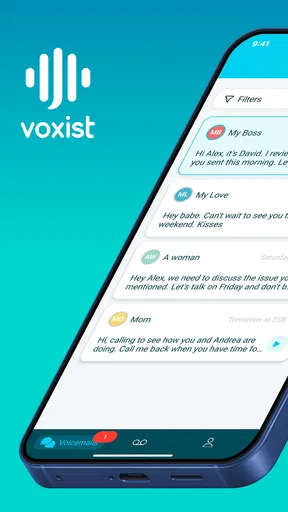
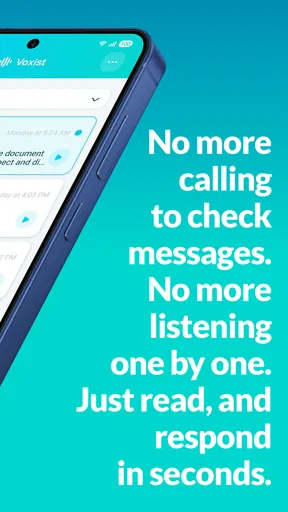
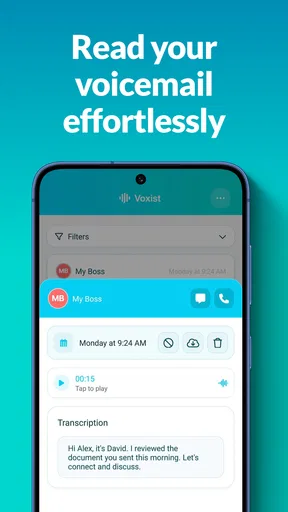
Voxist is a nifty app that transcribes your voicemails into text. It’s available for both Android and iOS, which means no matter what kind of smartphone you have, you can enjoy its benefits. The app is designed to make your life simpler by allowing you to read your voicemails instead of listening to them. This is especially handy when you’re in a meeting or in a noisy environment where listening to voicemails isn’t feasible.
The setup process is straightforward. Once you've downloaded the app, it guides you through the necessary steps to forward your voicemail to Voxist. The app then converts your messages into text and sends them straight to your phone. Easy peasy!
Features That Stand Out
One of the coolest things about Voxist is its ability to transcribe voicemails in multiple languages. So, if you’re someone who receives messages in different languages, Voxist has got you covered. The app supports English, French, Spanish, and more, which is a huge plus in our increasingly global world.
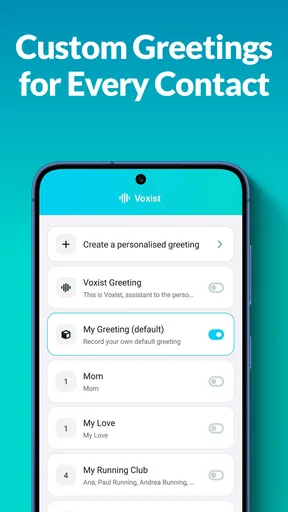
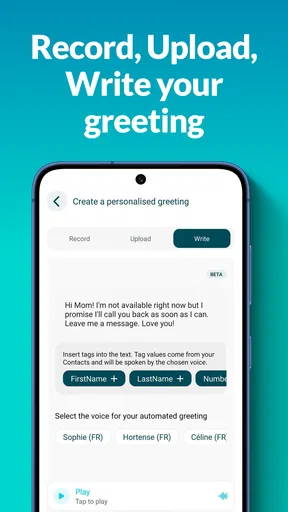
Another feature that I absolutely love is the personalized greetings. You can set up custom greetings for different contacts. Imagine surprising your mom with a lovely personalized message when she calls. It adds a nice touch of personalization that I think many of us will appreciate.
Let’s not forget the integration capabilities. Voxist works seamlessly with your email, allowing you to receive your transcriptions directly in your inbox. This means you can keep a tidy record of all your voicemails and access them anytime, anywhere.
User Experience and Interface
Now, let’s talk about the user interface. I found it to be incredibly intuitive and user-friendly. The design is clean, and navigating through the app is a breeze. Everything is laid out in a way that even if you’re not tech-savvy, you’ll have no trouble finding your way around.
I also appreciated the notifications. The app sends you a notification every time you receive a new voicemail transcription. This way, you’re always in the loop and can respond promptly if needed. And, if you’re someone who gets a lot of voicemails, you can rest easy knowing that Voxist archives them for you, so you can go back and read them at your leisure.
Why You Should Give It a Try
If you’re still on the fence about whether or not you need Voxist, let me just say that it’s more than just a voicemail transcription service. It’s an app that’s designed to save you time and make managing your voicemails a whole lot easier. Whether you’re a busy professional or someone who just doesn’t like listening to voicemails, Voxist is a game-changer.
Plus, there’s a free version available, which means you can try it out without any commitment. If you find that you love it (which you probably will), there are premium options available that offer even more features.
In the end, Voxist: read your voicemail is a brilliant solution for anyone looking to streamline their voicemail experience. It’s efficient, easy to use, and incredibly convenient. So, go ahead, give it a shot, and let me know what you think. I have a feeling you’ll wonder how you ever lived without it!
Pros
- Easy integration with phone contacts.
- Customizable voicemail greetings.
- Intuitive and user-friendly interface.
- Supports multiple languages for transcripts.
- Voicemail transcriptions are accurate.
Cons
- Limited free features compared to premium.
- Occasional delays in message delivery.
- Requires constant internet connection.
- Transcription errors with strong accents.
- Ads in the free version can be intrusive.
FAQs for Voxist: read your voicemail
What is Voxist and how does it work?
Voxist is a smart voicemail app that converts your voicemails into readable text, allowing you to read your messages at your convenience. When someone leaves a voicemail, Voxist transcribes the audio into text and sends it directly to your phone. This feature is perfect for situations where listening to voicemails isn’t feasible.
Is Voxist available for both Android and iOS devices?
Yes, Voxist is available for download on both Android and iOS platforms. Users can easily find the app on the Google Play Store for Android devices and the Apple App Store for iOS devices. The app is designed to provide a seamless experience across different operating systems.
Are there any costs associated with using Voxist?
Voxist offers both free and premium subscription plans. The free version includes basic voicemail transcription features, while the premium plan offers advanced functionalities such as unlimited transcriptions, custom greetings, and removal of ads. Users can choose the plan that best suits their needs.
How accurate are the voicemail transcriptions provided by Voxist?
Voxist uses advanced voice recognition technology to transcribe voicemails with high accuracy. However, transcription accuracy may vary based on several factors, such as the speaker's accent, background noise, and audio quality. Regular updates and AI improvements aim to enhance transcription precision over time.
Can I customize my voicemail greetings with Voxist?
Yes, Voxist allows you to personalize your voicemail greetings. With the premium plan, you can create multiple custom greetings tailored to specific callers or situations. This feature is particularly useful for maintaining a professional image or providing specific instructions to different callers.


